

AdlER
Business Suite


AdlER OVERVIEW
The winning edge is critical for any organization in today’s business world,
which has become very competitive. For an effective output, an ERP framework
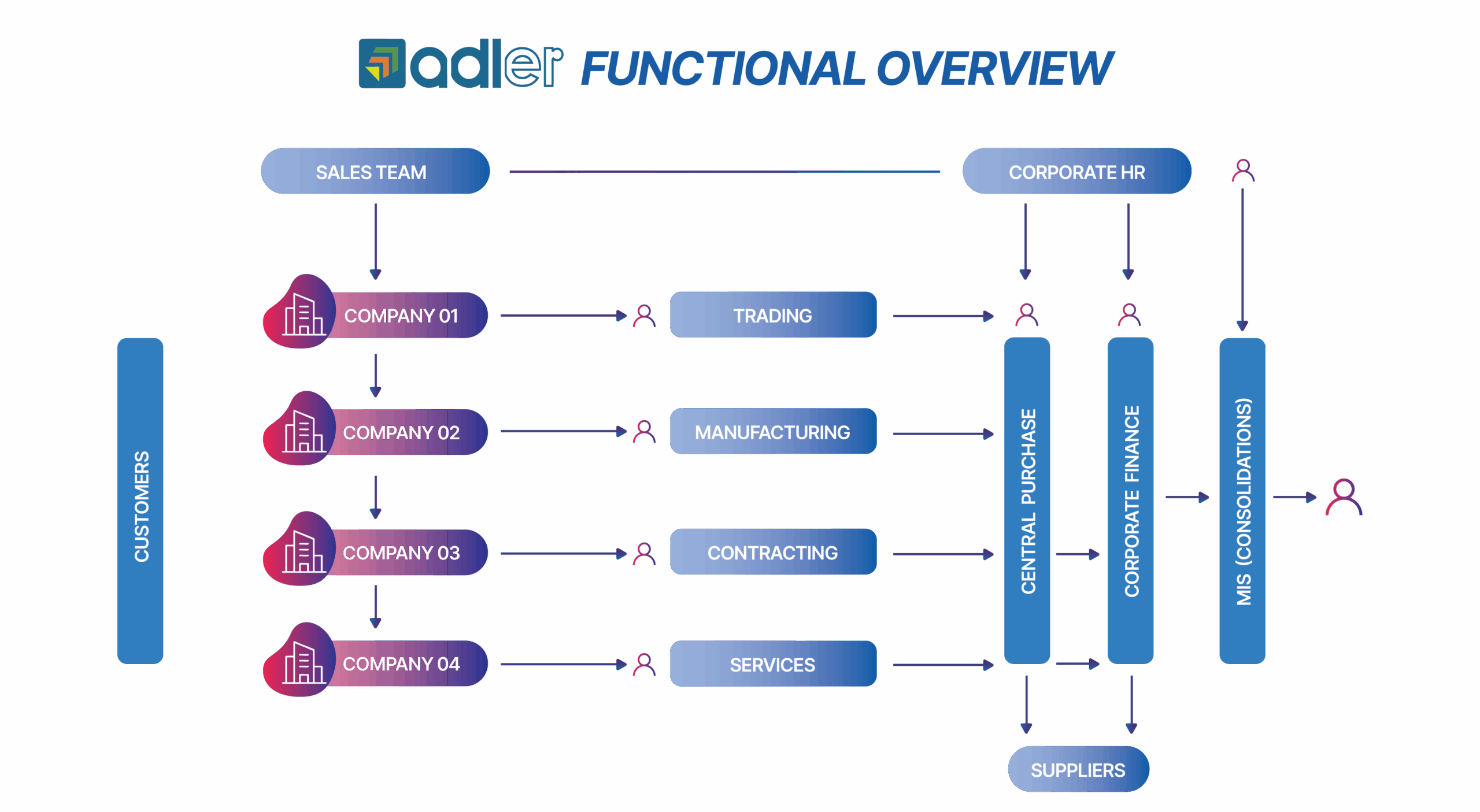
should flawlessly merge information from one department to another and address the organisation’s needs to reduce costs, improve overall customer service, enhance company performance and facilitate growth. AdlER does exactly this and ensures that the core functions, including financials, human resources, sales, procurement and inventory management and reporting systems are dynamically improved.
AdlER is an integrated enterprise resource planning application framework designed specifically to meet the operational needs of single or multiple companies, small to large-sized organizations. With well-covered and extended functionalities, excellent user interfaces and a rapid implementation cycle, AdlER provides a comprehensive solution with low total cost of ownership. AdlER is a flexible, mature, feature-rich and fully integrated business information system that helps you take control of all your business needs. Available as cloud-hosted and on-premises versions, AdlER can address the business situations of small-sized companies with single-location users to corporates with multi-location users.
Few salient features of AdlER
- Automated alerts and reminders regarding expiry of key documents like visa, passport etc.
- Integrated with Finance for centralized Pay bill Processing.
- All Employee amenities are controlled through the system.
- PRO activities and Corporate regulations can be managed through system.
- Complete purchase activities of the group centrally controlled through the system.
- The input of Purchase requisitions converted to PO and same reference till material receipts and supplier payments with no multiple or duplicate data entry .
- Provides total purchase control with corporate purchase and effective purchase planning.
- Integrated with finance with auto posting.
- Provides effective cost control and control on inventory.
- Project purchases controlled through project budgets, BOQ and purchase plan, integrated with finance.
- Supplier payments managed by corporate purchase department which provides better supplier management.
- Tracking of Sales and marketing activity of sales team.
- Multiple options for quotation preparations and costing sheet.
- Flexible search panel for product search.
- Option to store competitor offers for analysis.
- Project status updates and stage wise billing.
- Project costing and quotation through the system.
- Cash flow and funds management.
- Corporate Finance functioning through the system.
- Consolidated and cumulative reports for the Group.
- LC management and bank facility management for controlling bank finance and utilization.
- More than 1,500 basic level reports available through the system.
- Multiple MIS reports for Business owners available through system.
- Integrated with report builder tools for flexible and advanced analytical reports.
- Easy to use selection panel to choose the report.
- Full-fledged audit trial functions.
- Advanced security features.
- User friendly, multiple search functions in all transaction screens.
Technology
AdlER is a full-fledged web-based ERP framework built with Microsoft technologies on the latest architecture. With
the capability to couple with SQL database, AdlER provides one of the most suitable ERP frameworks for small to large-scale organizations with the latest technology available. The state-of-the-art relational database ensures extensive
functionality and high performance for multiple business verticals. AdlER’s superior functionality, built-in practices,
complete integration, unparalleled customer support, seamless implementation and mobile accessibility allow you to
stay up to date, giving you an edge over your competitors. More than an off-the-shelf system, the customization
flexibility of AdlER at the client’s request allows them to optimize the operational efficiency of the organization. We
incorporate regular enhancements into the core AdlER system, eliminating any trouble while applying future
versions or maintenance releases.
AdlER -i promises to stay on the forefront of technology so that the performance of AdlER exceeds the customers’ expectations. AdlER is available as a Microsoft Azure-hosted version or can be
implemented on-premises in the client’s data centre.

Application dashboards
The dashboards are the direct performance indicators of the organisation, and it is a vital Business Intelligence (BI) tool that is required for any company. AdlER comes with various dashboards that provide data to the users and decision makers. AdlER has the option to set dashboards in all the modules, and the configuration tools help the system administrator to set up dashboards for users based on the user levels, hierarchy, company settings, module access, etc. Within the dashboard, there are settings options to set the graph type, display type, etc, which the user can set.
Alerts
AdlER has a unique feature of system alerts, which keeps the user always aware of the priority tasks to be completed. Every module has the alert functions, which can be set based on the user’s permission settings. From the alert screen, there is an option to drill down and see the details without going into the corresponding reports. For example, in the procurement department alerts, if the systems show 20 purchase orders pending for delivery, the user can drill down and see the details of all 20 POs. There are options to set the configuration parameters like the frequency of alerts, advanced information time frame, minimum/maximum value settings, etc.

Approval workflows
AdlER has an in-built workflow for approval cycles in almost all modules. The system
administrator can set the approval workflows based on the hierarchy of the organization, based on various parameters. The system can alert the approvers regarding the notifications for approvals. The requester can see the status of his request at any point in time.
Core modules
Human Resource Management & Payroll

Recruitment Management
• Manpower Planning
• Vacancy Request
• Vacancy Release
• Social Advertisements
• Candidate CV Entries
• Interview Call Letter
• Candidate Assessment
• Offer Letters

Employee Onboarding
• Passport control
• Visa Details
• Visa status updation
• Visa / Passport expiry reminders
• Labour Contract Register
• Fingerprint Register
• Exit Permit

Employee Information Management
• Employee Profile Management
• Employee Family Management
• Employee Pay band/grade
• Employee Document
Management
• Shift Allocations
• Business Visa
• Document Request
• Employee Bank Details

Employee Amenity
• Amenity Request
• Allocation/De allocation
• Asset Request
• Asset Allocation
• De allocation

Attendance /
Shift Management
• Time sheet
(Biometric/Manual)
• Timesheet Updation (Daily/Monthly)
• Shift management
• Duty Roaster
• Wages/Salary management
• Absenteeism monitoring
• Employee Project Allocation
• Project wise Attendance Tracking
• Timesheet Updation (Daily/Monthly)
• Shift management
• Duty Roaster
• Wages/Salary management
• Absenteeism monitoring
• Employee Project Allocation
• Project wise Attendance Tracking

General Administration & Corporate Relations Management
• Property Details
• QCC Registration
• Computer Card
• Commercial Registrations
• Fire Certificate
• Health certificate
• Municipality Permits
• Other Documents
• QCC Registration
• Computer Card
• Commercial Registrations
• Fire Certificate
• Health certificate
• Municipality Permits
• Other Documents

Training & Development
• Training Plan
• Training need Assessment
• Capacity Building Programs
• Training Requests
• Training Schedule
• Training Fee Deduction
• Training Database
• Training Feedback Attribute
• Training need Assessment
• Capacity Building Programs
• Training Requests
• Training Schedule
• Training Fee Deduction
• Training Database
• Training Feedback Attribute

Accommodation
Management
• Accommodation Request
• Accommodation Allocation
• Service Request
• Service Register
• Service Invoice
• Accommodation Allocation
• Service Request
• Service Register
• Service Invoice

Compensation & Benefits
• Configure leave policies
• Annual Leave Planner
• Leave Application
• Leave Approval
• Job Handover
• Clearance Certificate
• Exit Permit
• Rejoin
• Leave Awarding Deductions
• Air Ticket Encashment
• Automated leave Calculation
• Leave Settlement
• Final Settlement
• Salary Revision /Increment
• Define earning / deduction types
• Annual Leave Planner
• Leave Application
• Leave Approval
• Job Handover
• Clearance Certificate
• Exit Permit
• Rejoin
• Leave Awarding Deductions
• Air Ticket Encashment
• Automated leave Calculation
• Leave Settlement
• Final Settlement
• Salary Revision /Increment
• Define earning / deduction types
• Pay process
• Preparation of Pay slip
• Shift allowances
• Overtime Process
• Education Allowances
• Salary Advance
• Salary Adjustment
• Paid vacation salary updation
• Gratuity Calculation
• Employee gratuity statement
• Employee loan management
• Provision Posting
• Salary Account Transfer
• General Insurance details/ claims/Refund
• Preparation of Pay slip
• Shift allowances
• Overtime Process
• Education Allowances
• Salary Advance
• Salary Adjustment
• Paid vacation salary updation
• Gratuity Calculation
• Employee gratuity statement
• Employee loan management
• Provision Posting
• Salary Account Transfer
• General Insurance details/ claims/Refund

Travel Management
• Air ticket Request
• Quotation Request
• Offer Updation
• Purchase Order
• Airline Ticket Issue
• Quotation Request
• Offer Updation
• Purchase Order
• Airline Ticket Issue

Employee Performance Management
• Appraisal Attributes
• Interim Evaluation
• Employee Performance Evaluation
• Management Appraisal
• Employee Self Appraisal
• Employee Service Records
• Service discontinuation
• Performance review
• Employee Promotion
• Interim Evaluation
• Employee Performance Evaluation
• Management Appraisal
• Employee Self Appraisal
• Employee Service Records
• Service discontinuation
• Performance review
• Employee Promotion
• Purchase requisitions
• Stock cards
• Supplier part numbers
• Re order levels and alerts
• Goods Receipt Note (GRN)
• Stock Receipt Voucher (SRV)
• Supplier Management
• Stock report link to projects
• Assistance to price items
• Print label with part number
and barcode
• Monitor and alert un-invoiced
delivery notes
• Maintain customer records
and accounts
• Financial reports and statistics
• Stock status
• Price lists
• Allocated items to projects.
• Fast moving / Slow moving items
• Dead stock
• Stock movement reports
• Stock value analysis reports
• Monthly stock and sales reports
• Costing sheets
• Multiple costing methods
• Stock updations
• Stores intends
• Material issues
• Material returns
• Stock transfers
• Materials storage
• Bin card allocation
• Material full/partial delivery

Finance management
• Financial Year settings
• Accounting Period
• Multi Currency settings
• Chart of Accounts settings
• Credit Customers
• Profit Center
• Multiple divisions
• Account Group
• Showroom A/C Mapping
• Banks
• General Accounts
• Sales Posting
• Debit Note
• Credit Note
• Journal
• Contra
• Receipts
• Payments
• Supplier Payment Request
• Customer LC Updation
• Cust. Bank Guarantee Req
• Sup. Bank Guarantee Upd.
• Bank Reconciliation
• Sales Cheque Posting
• Petty Cash
• General Ledger
• Budget Request
• Trail Balance – Analysis
• Budgeting
• Roll over budgeting
• Budget comparisons
• Budget Reports
• Post Dated Cheque received
• Post Dated Cheque issued
• Showroom A/C Map
• Petty Cash Report
• Payables Aging
• Receivables Aging
• Cash Flow
• Day Book
• Trial balance
• Profit & Loss A/c
• Balance Sheet
• Ratio analysis reports
• Income statements
• Year End Procedure
• Fixed Assets management
• Post Dated Cheque received
• Post Dated Cheque issued
• Showroom A/C Map
• Petty Cash Report
• Payables Aging
• Receivables Aging
• Cash Flow
• Day Book
• Trial balance
• Profit & Loss A/c
• Balance Sheet
• Ratio analysis reports
• Income statements
• Year End Procedure
• Fixed Assets management

Sales & Marketing
• Lead Capture
• Enquiry Tracking
• Lead Assignment
• Pipeline Tracking
• Opportunity Tracking
• Lead Prioritization
• Quote Builder
• Branded Quotations
• Quote Version Control
• Order Conversion
• Costing Review
• Approval Workflows
• Approval Workflows
• Pricing Validation
• Customer Communication
• Email Tracking
• Interaction History
• Follow-up Scheduling
• Automated Reminders
• Task Management
• Email Campaigns
• SMS Campaigns
• Audience Segmentation
• Campaign Tracking
• Sales Funnel View
• Deal Stage Tracking
• Pipeline Analysis
• Bottleneck Identification
• Team Performance Tracking
• Conversion Analysis
• Response Time Tracking
• Activity Reports
• Multi-user Access
AdlER Product Variants
AdlER STANDARD
The standard version is best suitable for medium level of organisations that have multiple business lines which are managed in a centralised or decentralised manner.
The features provided in this version ensure that the organisation will not require
any additional manual processes to manage the business. The array of reports in
each module is selected based on its significance to the business. The standard
version can be implemented in an organisation where the TCO (total cost of ownership)
The solution is at a moderate level.


AdlER ENTERPRISE
AdlER enterprise is the premium solution suitable for enterprise level organisations
with multiple business houses and subdivisions. Consolidations are possible at different levels based on the organisational structure. More than 1000 standard reports
are available across the core modules and any vertical specific modules can be
plugged in to the solution as and when required. The solution provides high level of
scalability, customisation flexibility and on top of all, an end to end enterprise level
solution suitable for the business.
